Adblock!
I want to hit on the big drum and clean up the browser for users as well as making the device safer. This will mainly focus on Windows on this, but can still be applied to macOS (will make a post about that later), since some of my recent customers have been mainly Windows oriented.
So, when people think of ad blockers, they usually picture someone trying to clean up their personal browsing experience. But in enterprise environments, ad blockers aren’t just about aesthetics — they’re a smart, strategic tool that improves security, productivity, and even compliance.
Some, but not all, reasons to deploy adblockers in an enterprise environmen;
Strengthening Enterprise Security
Cybersecurity threats are evolving, and not all of them come through phishing emails or dodgy downloads. Malvertising — malicious ads that spread malware — can compromise systems without a single click. By blocking ads and third-party scripts, ad blockers eliminate a common vector for these kinds of attacks, significantly reducing risk across the organization.
Boosting Employee Productivity
Let’s face it: ads are distracting. Whether it's a flashy banner or an auto-playing video, these interruptions pull attention away from work. By removing visual clutter and noise from web pages, ad blockers help employees stay focused. Plus, pages load faster.
Saving Bandwidth and Reducing IT Load
Ad content consumes more than just attention — it eats up bandwidth and system resources. In a large-scale environment with hundreds or thousands of devices, this adds up fast. With ad blockers in place, companies can see noticeable reductions in network traffic and hardware strain, translating into smoother performance and potentially lower IT costs.
Supporting Privacy and Regulatory Compliance
Tracking scripts embedded in ads can quietly collect data about users, often without their knowledge. For businesses subject to privacy regulations like GDPR or HIPAA, this presents a serious compliance issue. Ad blockers help curb unauthorized data sharing, contributing to better data hygiene and more control over what information leaves the network.
Delivering a Better Web Experience
Cleaner interfaces mean happier users. Employees benefit from faster, more readable websites without the distraction or frustration of intrusive advertising. For teams using web-based tools, this improvement in user experience can have a real impact on daily workflow.
Ok, so enough yapping, let's get to work.
Deploy Adblock with Intune
So I will be deploying uBlock Origin since I think it's the best one out the personally and that I've got experience with.
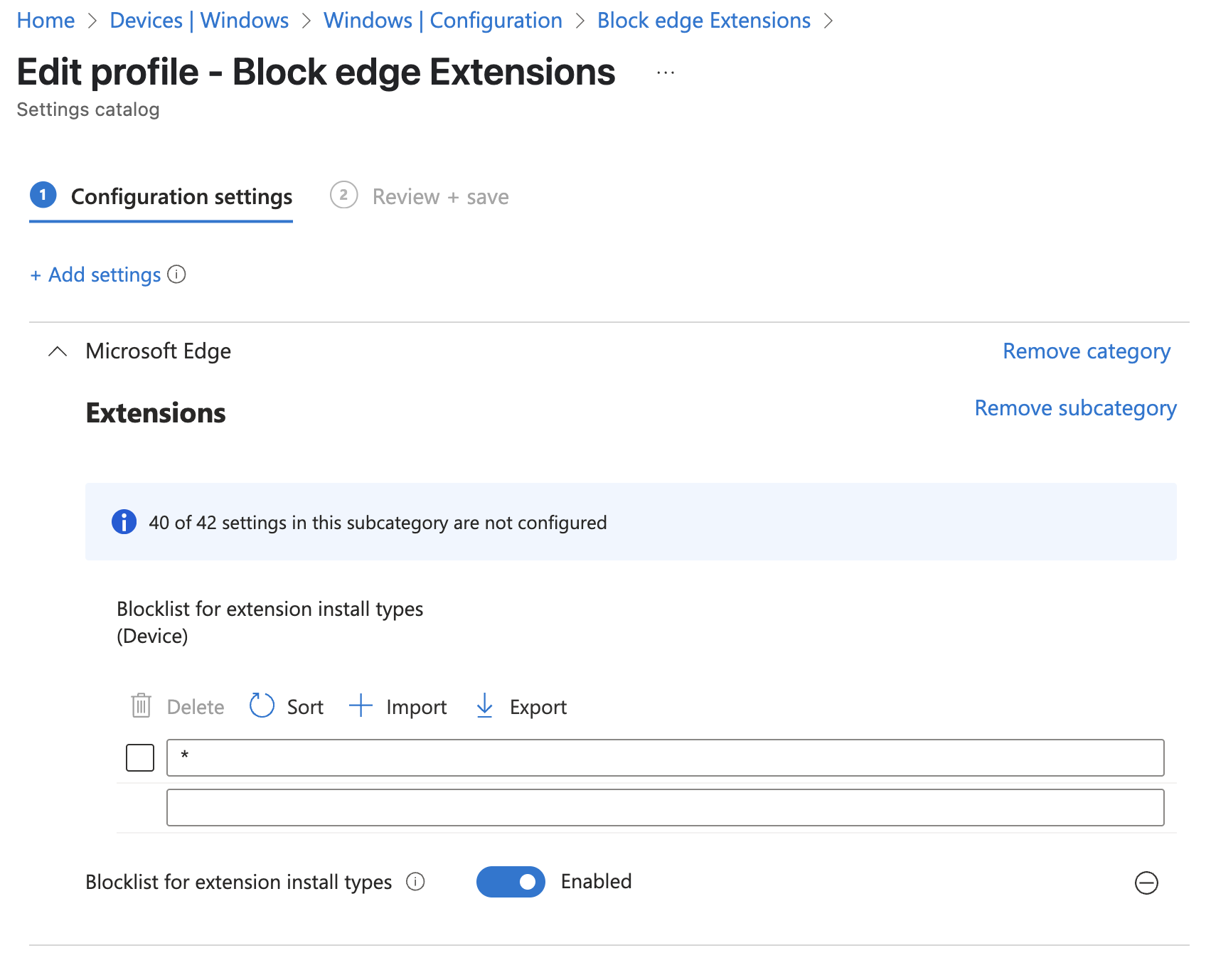
First I block all extensions and whitelist whenever it's necessary. This way you also get control over extensions that could possibly do harmful things or leak data. Go to Devices -> Windows -> Configuration -> Create -> New Policy and create a Settings Catalog profile. Search for "Extensions" and then choose "Microsoft Edge\Extensions", then select the options as pictured below to Block All extensions with a wildcard. If you already have a Edge configuration policy, you can add these settings to that configuration if you'd like.
Now we need to deploy uBlock Origin and make an exception for the extension in Edge. Create a new configuration profile and search for the same setting then add the following as pictured below.
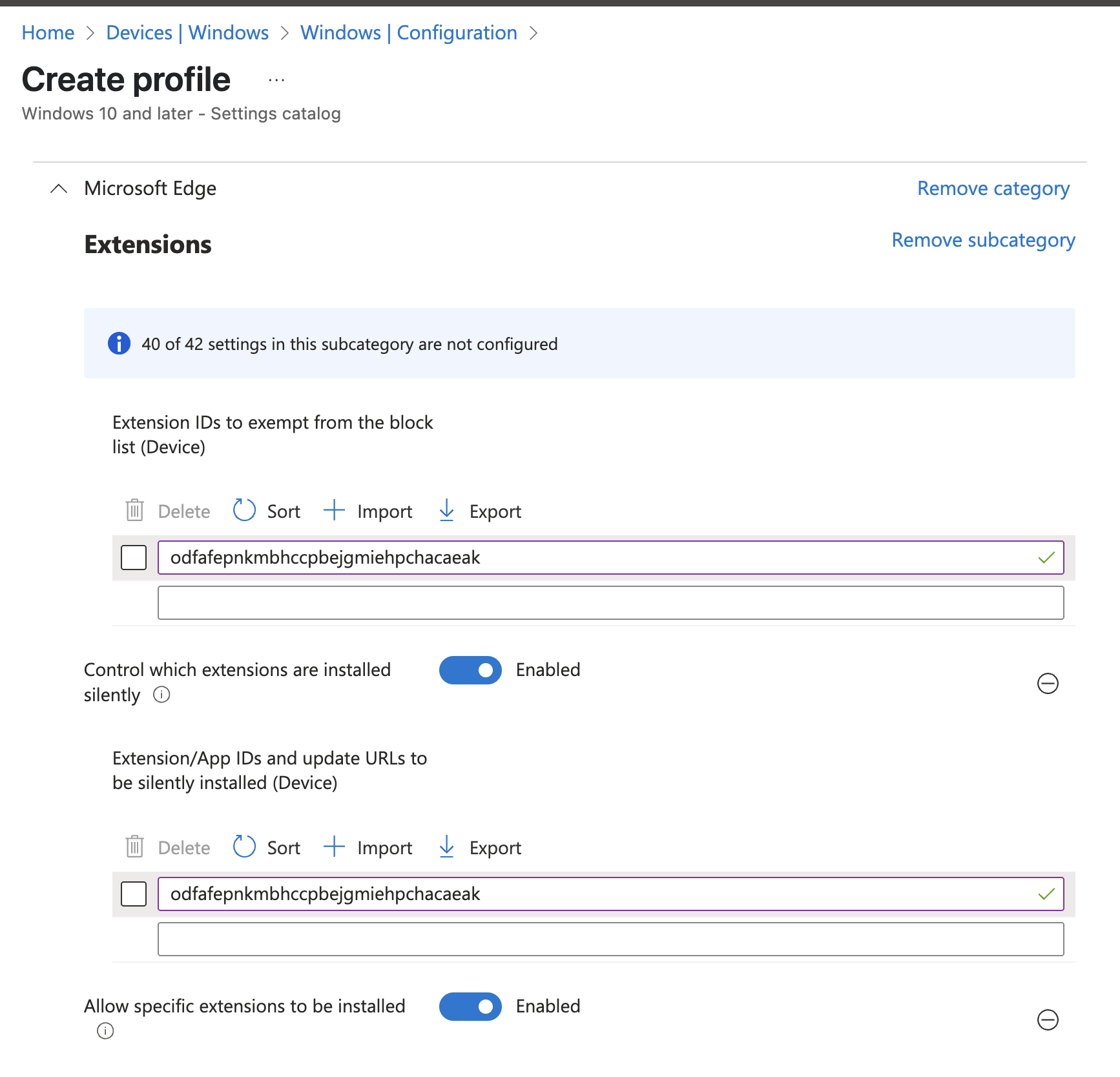
Then we need to find the extension id for uBlock. You can find the Id's for extensions by browsing the Add-On "store", then look at the URL. In the end of the URL there will be a block with random letters, this is the ID you need to paste.
Exmple: 
When deploying this setting, we will Whitelist the extension (since we block all extension with a wildcard) and automatically install the extension without the user needing to do anything.
In the next post, I will show you how to configure a list with exteptions and other modifiers with Powershell for the uBlock extension!