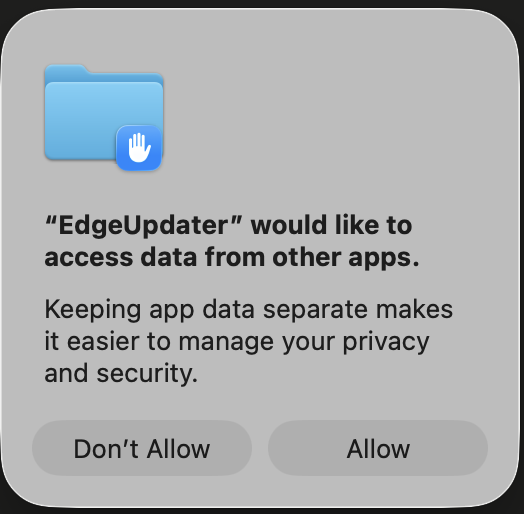
Latest talk on the town if you're managing macOS devices with Intune is likely the scenatio that your users are getting spammed by a popup saying "EdgeUpdater would like to access data from other apps" — and clicking Allow does absolutely nothing — this post is for you.
What's Actually Happening
This is a macOS TCC (Transparency, Consent, and Control) enforcement issue, made worse by the presence of MDM — and it involves two separate TCC services, not one.
EdgeUpdater — Microsoft's background updater for Edge, which runs as a separate process from the browser itself — makes two distinct TCC requests on each run:
kTCCServiceSystemPolicyAllFiles (Full Disk Access) — needed to read and write its own coordination files, including a shared preferences lock (GlobalPrefs) that synchronises state between its concurrent processes. On MDM-managed devices with a restrictive PPPC profile, this is silently denied — no popup, no prompt, just a blocked syscall.
kTCCServiceSystemPolicyAppData (App Data) — a more targeted service protecting access to other apps' container data. This is what generates the popup: "EdgeUpdater would like to access data from other apps." Because there's no MDM rule covering this service at all, TCC falls through to prompting the user.
So the popup isn't coming from the Full Disk Access denial — that one fails silently. The popup comes from the App Data request, which has no MDM policy either way and therefore asks the user. Clicking Allow still does nothing, because the underlying FDA denial causes EdgeUpdater to crash and respawn immediately, triggering the whole sequence again.
When FDA access is blocked, the cascade of failures looks like this:
- It can't acquire
GlobalPrefs→ multiple instances spawn without coordination - It can't read its own Keystone compatibility data → version state is lost each run
- It can't determine which version of itself is "active" → version arbitration fails
- Every new instance hits TCC → every new instance triggers the popup
On MDM-managed devices, TCC decisions for managed services are authoritative and user-immutable. The auth_reason value in the TCC database will be 5 — MDM policy — which means user consent is completely bypassed for the FDA request. The App Data prompt appears, but any Allow response is rendered meaningless by the underlying crash loop caused by the FDA denial.
Non-enrolled devices don't have this problem because there's no MDM policy overriding TCC, so the standard user consent flow works as intended for both services.
How We Diagnosed It
Step 1 — Query the TCC database
sudo sqlite3 /Library/Application\ Support/com.apple.TCC/TCC.db \
  "SELECT client, service, auth_value, auth_reason FROM access WHERE client LIKE '%EdgeUpdater%';"
Output:
com.microsoft.EdgeUpdater|kTCCServiceSystemPolicyAllFiles|0|5
Two fields told the whole story:
auth_value = 0→ deniedauth_reason = 5→ MDM-enforced, user cannot override
Step 2 — Check for an existing PPPC profile
sudo profiles show -all | grep -A 30 -i "EdgeUpdater"Returned nothing. No explicit PPPC entry for com.microsoft.EdgeUpdater — meaning it was being caught by a blanket restrictive policy with no allowlist entry for EdgeUpdater specifically.
Step 3 — Find the binary and confirm the process storm
ps aux | grep -i edgeRevealed EdgeUpdater running from a versioned path under ~/Library/Application Support/Microsoft/EdgeUpdater/, with multiple concurrent instances — --wake, --server, --install — all spawning in a tight loop. Each one hitting TCC, each one triggering a popup.
Step 4 — Extract the code requirement
codesign -dr - ~/Library/Application\ Support/Microsoft/EdgeUpdater/149.0.4019.0/EdgeUpdater.app 2>&1Output:
designated => identifier "com.microsoft.EdgeUpdater" and anchor apple generic and
certificate 1[field.1.2.840.113635.100.6.2.6] /* exists */ and
certificate leaf[field.1.2.840.113635.100.6.1.13] /* exists */ and
certificate leaf[subject.OU] = UBF8T346G9
UBF8T346G9 is Microsoft's Apple Developer Team ID. This is the designated requirement string needed for the PPPC payload — without it, the policy can't cryptographically verify the binary identity.
Step 5 — Catch it live with the TCC log stream
To observe TCC decisions in real time, the key is filtering on tccd — the TCC daemon that makes and logs all decisions — not on the requesting process itself. EdgeUpdater triggers the check, but the log entries are written by tccd:
log stream --predicate 'subsystem == "com.apple.TCC" AND composedMessage CONTAINS "EdgeUpdater"' --infoThis captured two distinct access requests firing simultaneously when the popup appeared:
Request 1 — Full Disk Access (silent denial):
Handling access request to kTCCServiceSystemPolicyAllFiles
ReqResult(Auth Right: Denied (Service Policy), promptType: 1, DB Action: None)
Denied by MDM policy before any prompt is shown. DB Action: None means it didn't even write to the TCC database — the policy short-circuits evaluation entirely.
Request 2 — App Data (generates the popup):
Handling access request to kTCCServiceSystemPolicyAppData
ReqResult(Auth Right: Unknown (Service Policy), promptType: 1, DB Action: None, UpdateVerifierData)
Unknown means no MDM rule exists for this service, so TCC falls through to the user prompt. The purpose string macOS displays is pulled directly from the system default:
'Keeping app data separate makes it easier to manage your privacy and security.'
Also notable: both requests arrive via com.apple.sandboxd as the requesting process, acting as a broker for the TCC check on EdgeUpdater's behalf.
What the EdgeUpdater log confirmed
The updater.log file at ~/Library/Application Support/Microsoft/EdgeUpdater/updater.log added further context:
Failed to acquire GlobalPrefs— In my logs, it repeated every ~3 minutes through the night, confirming FDA denial was blocking inter-process coordinationCloudPolicyOverridesPlatformPolicy=1— Intune cloud policy is set to override local platform policy, which is why the MDM denial wins unconditionally- Two EdgeUpdater versions in conflict — v147 (bundled inside Edge 148) and v149 were both trying to register simultaneously, compounding the lock failure
ECS fetch disabled by policy— Edge Configuration Service fetching is disabled by an Intune policy, expected in a managed environment
The Root Cause
This is where it gets interesting. The issue occurred in a lab tenant with no explicit PPPC profile restricting Full Disk Access — no allowlist, no deny rules, nothing targeting EdgeUpdater. Yet the TCC database still showed auth_reason=5 (MDM policy) with auth_value=0 (denied). But the same issue also surfaces in tenants where restrictive PPPC profiles are applied. Did Microsoft pull an oopsie with Edge?
One probable explanation is that macOS applies a default-deny MDM posture for certain TCC services on enrolled devices, even without an explicit administrator-configured restriction — meaning the absence of an explicit allow rule may be treated as an implicit deny with MDM authority, rather than falling through to the standard user consent flow. This would explain the clean-tenant behaviour, but it's an inference rather than something Apple formally documents.
What we can say with confidence is that the fix is the same regardless of which path led here: EdgeUpdater needs to be explicitly allowed, and the absence of a deny rule is not sufficient. Whether that's because your PPPC profile doesn't list it, or because MDM enrollment alone triggers the governed posture, the end state is identical — auth_reason=5, popup storm, clicking Allow does nothing.
EdgeUpdater doesn't live in /Applications and isn't visible in the standard Privacy & Security UI until it's already tried (and failed) to get access. It installs itself into the user's Library under a versioned path, and Microsoft bundles a copy of it inside the Edge app bundle itself as a bootstrapper. There's no obvious signal that a PPPC entry is needed until users start reporting the popup — and Microsoft's own Intune deployment documentation doesn't mention it.
The Fix
1. Add EdgeUpdater with mobileconfig
SystemPolicyAllFiles (Full Disk Access) is the only entry required. Testing on a device with the FDA PPPC entry applied confirmed no popup appeared, and the TCC log stream showed every FDA request hitting Auth:Allowed (MDM Policy) — with EdgeUpdater successfully completing version arbitration and cleaning up the older version folder on its own.
If you deploy PPPC policies with a .mobileconfig or other means, add the following lines under SystemPolicyAllFiles to allow EdgeUpdater and remove the pop ups.:
<key>SystemPolicyAllFiles</key>
<array>
    <dict>
        <key>Allowed</key>
        <true/>
        <key>CodeRequirement</key>
        <string>identifier "com.microsoft.EdgeUpdater" and anchor apple generic and certificate 1[field.1.2.840.113635.100.6.2.6] /* exists */ and certificate leaf[field.1.2.840.113635.100.6.1.13] /* exists */ and certificate leaf[subject.OU] = UBF8T346G9</string>
        <key>Comment</key>
        <string>Microsoft EdgeUpdater - Full Disk Access</string>
        <key>Identifier</key>
        <string>com.microsoft.EdgeUpdater</string>
        <key>IdentifierType</key>
        <string>bundleID</string>
        <key>StaticCode</key>
        <false/>
    </dict>
</array>
Use bundleID as the identifier type rather than a path — EdgeUpdater installs under a versioned path that changes with every update, so a path-based identifier would break on each upgrade. Note that this applies whether EdgeUpdater is installed at system scope (/Library/) or user scope (~/Library/) — the bundle ID and code requirement are identical in both cases.
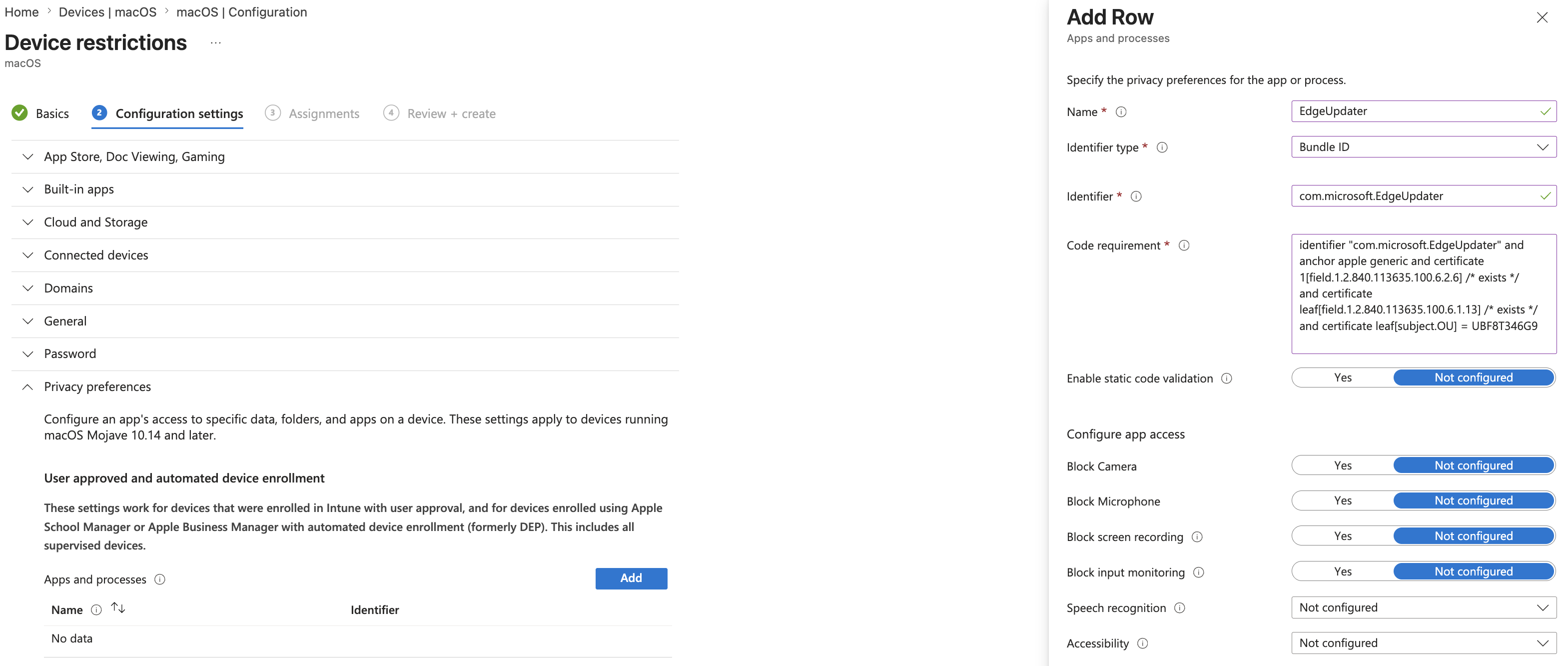
2. Add EdgeUpdater with Intune Template:
If you deploy PPPC via the Device Restrictions template in Intune rather than a custom mobileconfig, configure the template as follow: Name: EdgeUpdater
IdentifierType: BundleID
Identifier: com.microsoft.EdgeUpdater
Code Requirement: identifier "com.microsoft.EdgeUpdater" and anchor apple generic and certificate 1[field.1.2.840.113635.100.6.2.6] /* exists */ and certificate leaf[field.1.2.840.113635.100.6.1.13] /* exists */ and certificate leaf[subject.OU] = UBF8T346G9
And then set Full disk access to Allow.
Bonus: A Note on PSSO
The updater log also showed this on every single run:
Device is MDM enrolled. Checking for Microsoft Corp tenant.
No tenant ID in PSSO device cert.
Microsoft Corp tenant not found via any layer.
EdgeUpdater actively checks whether the device is enrolled in a Microsoft Corporate tenant via Platform SSO. If you're planning to roll out PSSO with Intune — or already have it partially configured — it's worth verifying that the device certificate is correctly scoped to your tenant. This won't cause the popup issue, but it does affect EdgeUpdater's ability to use enterprise update channels and Microsoft-side management policies.